An assistant can email people about three things: a new draft waiting for review, a weekly summary of what it did, and a new Q&A suggestion to approve. All three are set on the assistant's Settings tab under Notifications (What Eloquens emails you about, and to whom.), each with its own switch and list of recipients.
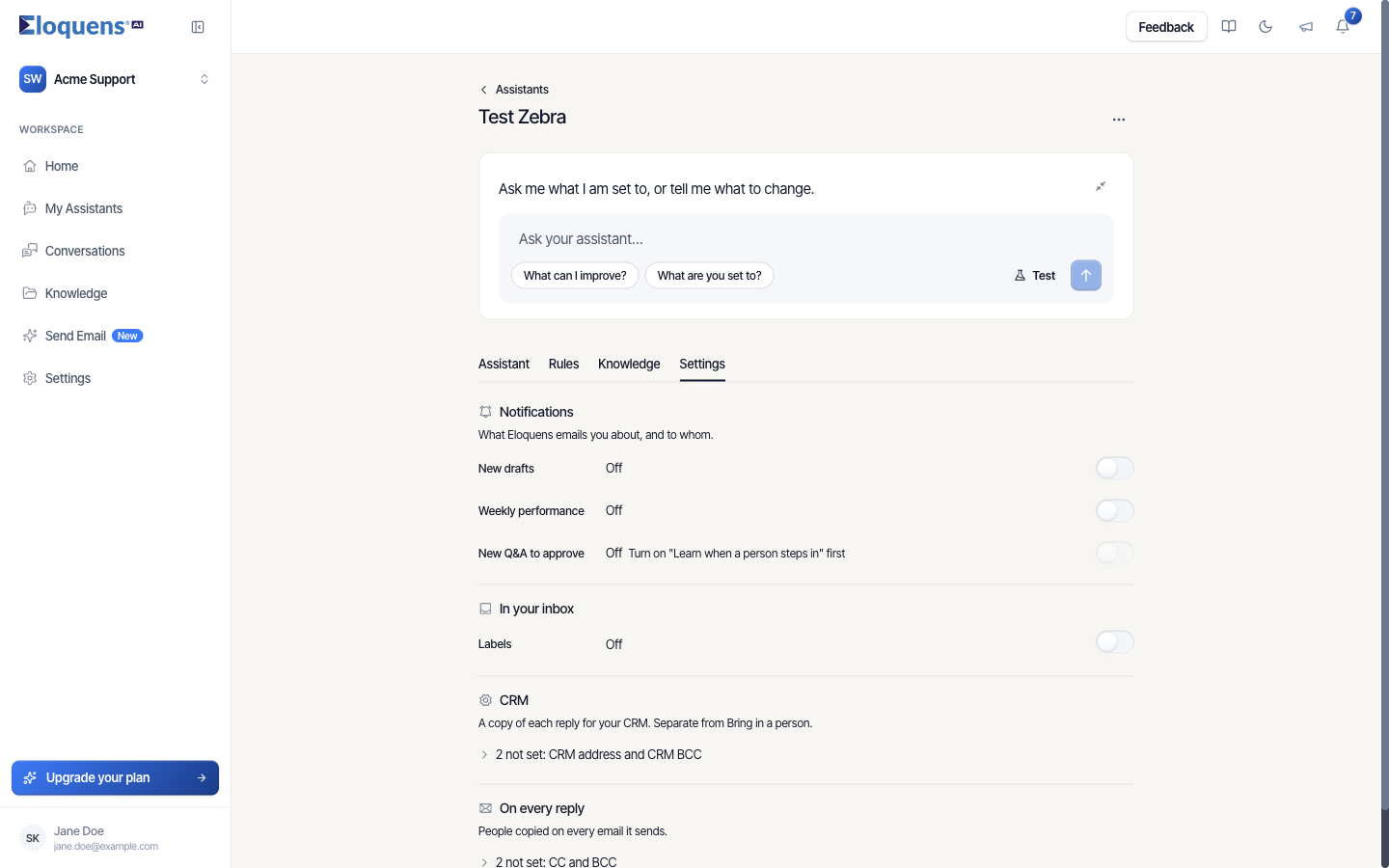
Set who gets notified
- Open the assistant and click the Settings tab.
- Under Notifications, find the row: New drafts, Weekly performance or New Q&A to approve.
- Click the switch, or the Change who gets … control beside it.
- Add addresses. Workspace members are suggested as you type; any valid address works.
- The row saves as soon as the list is valid and reports Saved.
Turning a row on starts it with the manager's address, since that is usually the person who should know. Without a manager the box opens empty. A row only counts as on once at least one address is saved; until then it reads Off.
New drafts
Sent each time the assistant leaves a draft for review, in Draft Mode or when Intelligent Send holds something back.
The email is titled New Email Draft Ready for Review (prefixed with the assistant's name) and contains:
- the assistant's name, the subject and the sender of the incoming email
- a preview of the incoming message and of the draft
- a Review Draft button that opens the draft in Conversations
Inside the app, the bell at the top shows drafts waiting for review from the last 30 days, so a long-running mailbox does not turn the bell into permanent noise. The Needs your review list on Home follows the time window you pick there.
If you switch an assistant into Draft Mode or Intelligent Send and nobody is set to be told about drafts, the page asks Who should know about new drafts? right there; you can add someone or click Not now.
Weekly performance
A summary email for each assistant with the switch on, sent every Monday shortly after midnight UTC and covering the previous seven days. The subject names the assistant and the week it covers.
It contains:
- emails processed, and the share the Smart Filter left alone
- replies sent automatically, and the share of the total
- drafts created, drafts sent, and drafts edited before sending
- an estimate of time saved
- a link to Home for the full picture
Recipients are whoever is on the Weekly performance row. Turning the row off keeps the saved addresses so you can turn it back on later without re-entering them.
New Q&A to approve
Sent when the assistant turns a colleague's reply into a suggested Q&A pair. This depends on Learn when a person steps in on the Knowledge tab; until that is on, the row is disabled and says Turn on "Learn when a person steps in" first. The email lists the new pairs and links to Knowledge, where you approve or discard them.
Good to know
- Notification emails come from Eloquens, not from the assistant's mailbox, and are not replies you can answer.
- These lists are separate from On every reply (CC and BCC on the replies themselves) and from CRM copies, both lower on the same tab.
- You can set recipients by asking: "Email ops@yourcompany.com about new drafts" in Ask your assistant does it, with an Approve step if the address is outside your domain.
Related articles
- Response modes: Draft Mode, Intelligent Send and Auto-Send
- Edit an assistant: the four tabs
- Ask your assistant to change its own settings
Soma Konate
Comments