Eloquens reads your email so an assistant can answer it. This article explains, in plain terms, what happens to that email: which AI models see it, how it is stored, who can read it, and how to delete it.
AI models
Eloquens uses frontier models from OpenAI and Anthropic, and updates the model mix as better models become available. The models receive the content needed to do the job (the incoming email, the relevant parts of your Knowledge, and your assistant's instructions) and return a draft or a decision.
Your data is never used to train or retrain our vendors' models.
Where your data is hosted
Eloquens runs on cloud infrastructure in the United States or in Europe. There are two instances; sign in to the one your account was created on:
- Global: https://app.eloquens.ai (hosted in the U.S.)
- European Union: https://app-eu.eloquens.ai (hosted in the EU)
Encrypted at rest, processed in a sealed environment
Your email bodies and knowledge content are encrypted at rest. The keys that decrypt them work only inside a sealed, hardware-isolated processing environment. Your assistant reads and writes mail inside that environment; the ordinary application servers, and the people who operate them, hold no readable copy of your message content.
This is why the support team cannot simply open your email. If a support engineer ever needs to read a message to investigate a problem, they must file a request, and nothing is revealed until you approve it with a code from your authenticator app. Access is time-limited, you can revoke it at any time, and every request is logged for you to review. See Support access requests.
Workspace memberships are also cryptographically signed, so access to a workspace's content follows a verified membership rather than a database row alone.
What you control
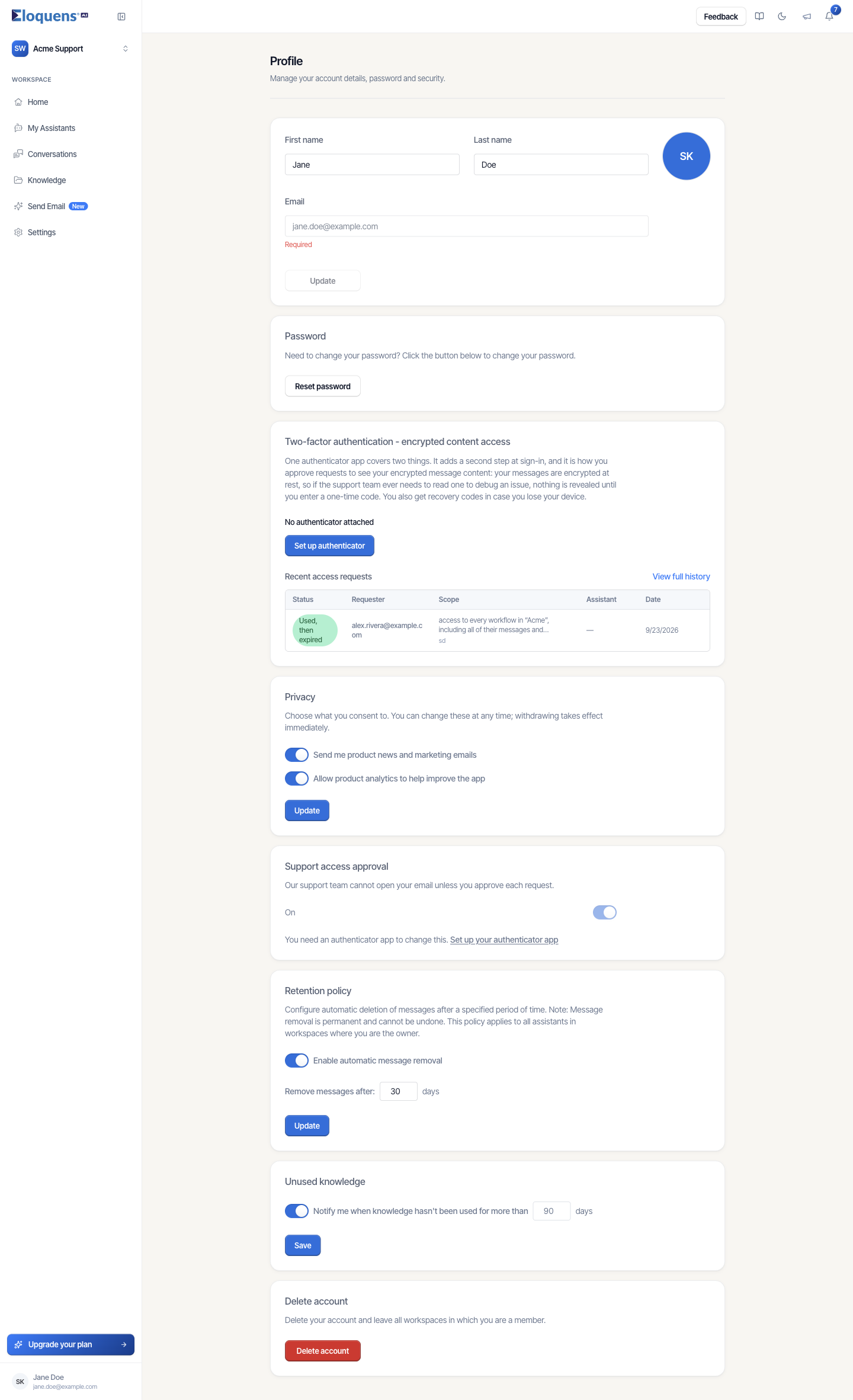
On your Profile page:
- Privacy: opt in or out of product news and of product analytics. Analytics only run for signed-in users who have consented.
- Support access approval: whether support can open your email without your approval.
- Retention policy: have messages removed automatically after a number of days you choose, across every assistant in workspaces you own. Removal is permanent.
- Two-factor authentication - encrypted content access: the authenticator app that protects sign-in and gates support access to your content.
- Unused knowledge: be told when a knowledge item has gone unused for longer than a number of days you choose.
- Delete account: see below.
Under Settings → Members, a workspace owner can also require that support access to the whole workspace's email goes through owner approval.
Deleting your data
- Open Profile from the account chip at the bottom of the left rail.
- Scroll to Delete account and click Delete account, then confirm.
- You are signed out. Your account and all of its workspaces and data are permanently deleted 30 days later.
- To change your mind, sign in during those 30 days and click Reactivate.
Removing a single mailbox from Settings → Email accounts disconnects it and turns off its assistants; it does not delete your account.
Good to know
- Eloquens emails you only about your account and, if you opted in, product news. Transactional messages such as invitations, verification codes and access-request notices never include the contents of your mail.
- The full Privacy Policy is at https://eloquens.ai/privacy and the Terms and Conditions at https://eloquens.ai/terms; both are linked from the sign-up page.
Related articles
- Support access requests
- Profile and two-factor authentication
- Settings overview: what lives where
Soma Konate
Comments