When you set up your first assistant on your first mailbox, Eloquens does not wait for new mail to start. It looks through the recent emails in that mailbox that nobody has answered yet and writes a draft reply for the ones that need one. This is called catching up. It gives you drafts to review on your first day.
What it does
- It reads recent emails in the mailbox that have not been replied to. It starts with the last 24 hours and looks further back, up to 7 days, until it has found up to 50 emails.
- It writes drafts only. Nothing is sent to anyone, whatever response mode the assistant uses.
- It follows your assistant's rules like any other email. Newsletters, notifications and mail that your Don't reply to rules cover are left alone, and an email the assistant cannot answer because the knowledge is missing is counted as such.
Catching up works for Gmail, Outlook and Kerio Connect mailboxes. It does not run for IMAP mailboxes. It runs once, for the first mailbox on your account.
Follow its progress
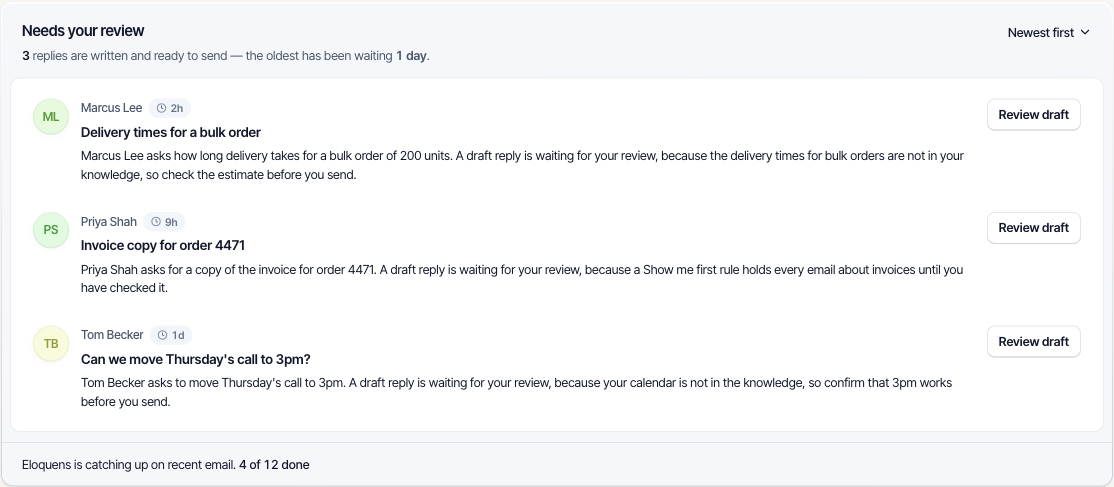
- Open Home. At the foot of Needs your review a line says Eloquens is going through your recent email. while it looks through the mailbox.
- When it has found the emails, the line changes to Eloquens is catching up on recent email. with a count such as 4 of 12 done.
- Drafts appear in Needs your review as they are ready. Click Review draft on a row to read, edit and send it.
- The bell shows one notice, Eloquens is going through your recent email, and keeps updating that same notice. Its button, See progress on Home, takes you to Home.
When it finishes
- The bell notice changes to a title such as Eloquens processed 20 recent emails from your inbox, with a line such as 5 drafts ready · 12 left alone · 2 held by your rules · 3 couldn't be answered yet: knowledge is missing. A category with none is left out. Its button is Review your drafts.
- You also get one email with the same title. Its button is Review your drafts, or Open Eloquens if there are no drafts. It contains only counts and a link, never a subject or a line of an email.
- If no email in the last 7 days needed a reply, the notice reads Eloquens checked your recent email with Nothing from the last 7 days needed a reply. and no email is sent.
Good to know
- The drafts wait for you. Review them in Home or in Conversations; send the ones you want.
- Emails the assistant could not answer because your knowledge is missing show up on Home under Ignored with Knowledge missing. Add the answer once and it covers every email that asks the same question.
- New mail that arrives after setup is handled by the assistant normally, according to its response mode.
Related articles
- Set up your first assistant
- Needs your review: drafts waiting on Home
- Review and send a draft
- Notifications and What's new
Soma Konate
Comments