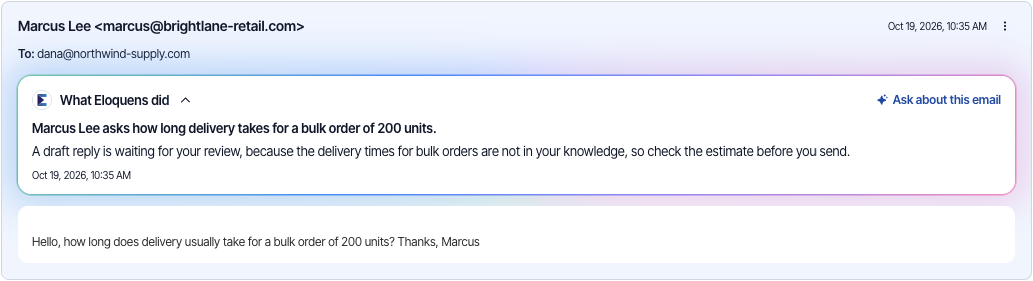
Under every email your assistant received, the What Eloquens did card gives two plain sentences: what the email was about, and what the assistant did with it and why. If the assistant could not find a fact it needed, the card says so as well. You can read it without opening anything else.
Read the explanation
- Open a conversation from Conversations, from Home, or from the bell.
- Find the customer's email. The What Eloquens did card sits directly under the email's header, above the text of the email, and is open when you arrive.
- Read the first sentence, in bold, for what the email was about. The second sentence says what the assistant did with it and why.
- Click the card's title to fold it away, and click it again to open it.
When the assistant could not find a fact it needed, the card ends with Eloquens could not find: followed by what was missing. That is a good hint of what to add to your knowledge. If Eloquens did not record an explanation for an email, the card says Eloquens did not record its reasoning for this email.
Ask a follow-up
Click Ask about this email on the card's title row to open a private chat about this one email. You can ask why it was handled this way, ask for a rule to change, or redo the email. See “Ask about this email, and redo it”.
When you arrive from Review draft
When you click Review draft on Home, the conversation opens at the customer's email so that What Eloquens did is the first thing you see. The draft is lower in the thread. If it is out of view, a Jump to the draft button appears at the bottom of the panel. Click it to go straight to the draft.
Long emails and drafts
- Long emails and long drafts are folded. Click Show more to read all of one and Show less to fold it again.
- Emails that were written with their own colours stay readable in dark mode.
Where else the same explanation appears
- On Home, each row under Needs your review and each row on the Ignored tab shows the assistant's own reasoning for that email. Hover over it to read all of it if it is cut off.
Related articles
- Ask about this email, and redo it
- Conversations: browse, search and read a thread
- Summarize a conversation
- Needs your review: drafts waiting on Home
Soma Konate
Comments