You can use Eloquens in English, Czech, German or Italian. The interface language is the language of menus, pages and messages in the app. It is a personal choice: it changes what you see, not what your teammates see.
Change the language
- Click your name or initials at the bottom of the left rail and choose Profile.
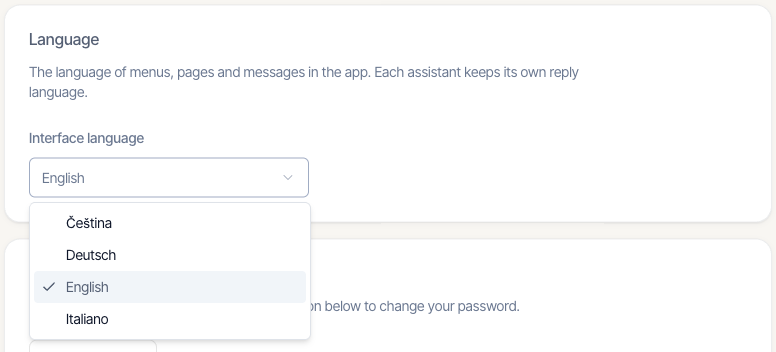
- Find the Language card.
- Open the Interface language list. Each language is written in its own name: English, Čeština, Deutsch and Italiano. That way you can find yours even if the page is in a language you cannot read.
- Choose a language. It saves as soon as you pick it, and the screen switches to it. A message confirms Language updated.
If the screen could not switch at once, the message reads Language saved. It will appear the next time you load the page. Reload the page to see it. If the choice could not be saved, you see Couldn't change the language. Please try again.
What changes and what does not
- Menus, buttons and messages in Eloquens follow your language. Some screens may still appear in English.
- Your choice follows your account, so it is the same on every device where you sign in.
- Each assistant keeps its own reply language. Changing your interface language does not change the language of the replies your assistants write to customers.
- The Chrome extension follows the language of your Chrome browser, not this setting.
Good to know
- To go back, choose English in the same list.
- The names of the products and mail providers, such as Eloquens, Gmail and Outlook, are not translated.
Related articles
- Profile and two-factor authentication
- Settings overview: what lives where
Soma Konate
Comments